


AI Interior & 3D Room Planner
4.413.00 Reviews
App Specs
- Version
- 1.1.1
- Updated On
- License
- Free
- Downloads
- 10,000+
- Developer
- BUCKETPLACE
- Categories
- House & Home
- Platform
- Android
Screenshots
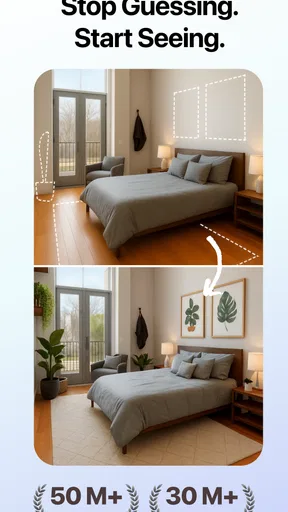
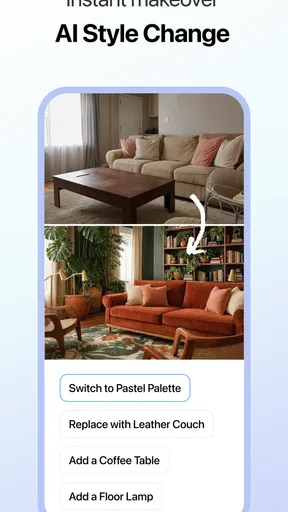
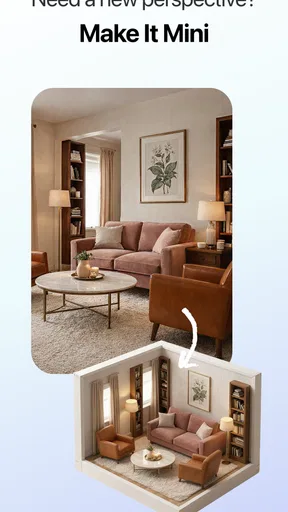
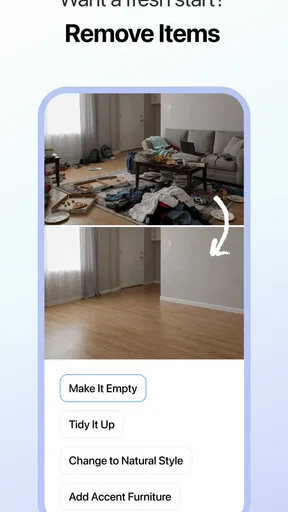
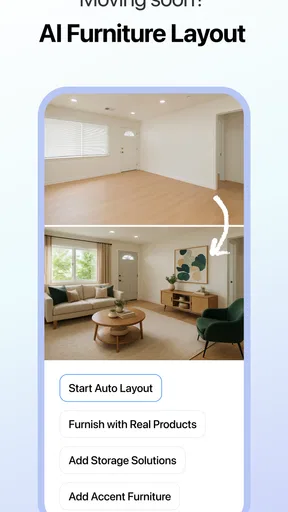
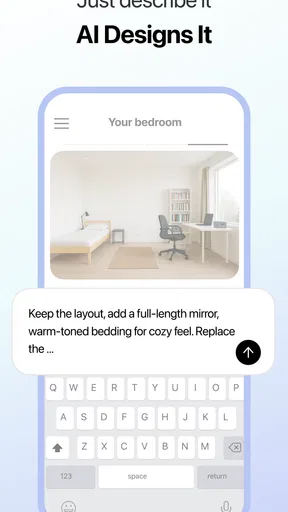

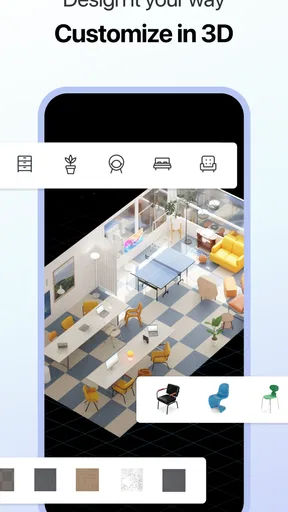
 Analysis by AppCompare
I’d judge an interior-planning app less by the first impressive render than by whether I still reach for it when a real room decision comes up. AI Interior & 3D Room Planner is appealing when I want to explore a look quickly, but its lasting value depends on using those ideas to answer practical questions: will the furniture fit, will the colors work in my light, and is the plan worth acting on?
When a quick visual reset is useful
The first week is the easiest time to enjoy a room-planning app. I can try a different arrangement without lifting a chair, compare a calmer palette with a bolder one, and get a visual starting point when an empty room feels difficult to imagine. The AI-led suggestions make that early exploration less intimidating, especially if I have a rough idea of the mood I want but no confident design vocabulary.
I’d get the most from it before buying anything, rather than after settling on a room’s contents. For example, if I’m deciding whether a reading corner belongs near a window or across the room, I can sketch out alternatives and use the 2D plan to think about the layout before looking at the 3D view for atmosphere. That order matters: an attractive perspective can make a cramped arrangement look more workable than it is.
For a useful first session, I’d gather room measurements and note fixed features such as doors, windows, and awkward corners before experimenting. Treat the result as a design prompt, not a building plan. A digital arrangement can help me spot a promising direction, but I would still check clearances and actual product dimensions before placing an order or moving heavy furniture.
What keeps it relevant after the novelty
The app makes more sense as a decision aid I return to at a few points in a project than as a daily habit. A room makeover usually has pauses: measuring, comparing options, checking costs, and deciding what to keep. A visual plan can be useful at each of those stages, provided I save or otherwise keep track of the version I prefer and do not mistake a polished mock-up for a finished specification.
Its value is clearest when a choice is hard to picture in isolation. If I’m weighing a light wall color against a darker one, or deciding whether a larger piece of furniture would dominate the room, viewing alternatives side by side can make a discussion with a housemate more concrete. The shared-design idea is also useful in principle for getting another person’s reaction, though I’d check how the current app handles access and changes before relying on it for a time-sensitive joint project.
Compared with browsing inspiration photos, a planner gives me a more room-specific way to test an idea. Compared with professional CAD or specialist design software, it is the more approachable place to start, not the tool I’d choose for construction documents or exact technical coordination. That distinction helps set expectations: it can narrow my options and make preferences visible, while final measurements, materials, and installation details still need real-world checking.
Worth Reading Before You Choose

Flipboard Shows What News Apps Must Do Beyond the Feed

Switching to Android Auto Means Rethinking Your Driving Routine

Google Calendar Makes a Crowded Week Easier to Manage

Ludo King Makes the Most of the Minutes Between Plans

Baby Panda World Brings Quick Play to Modern Phones, but Its Game Library Feels Busy

ESPN’s Live Game View Makes Following Close Games Easier
The upkeep and the points that can wear thin
The maintenance burden is mostly the effort of keeping a plan grounded in reality. If I change a measurement, add a bulky item, or discover that a doorway limits how furniture can be moved, I need to revisit the layout rather than trusting an old visualization. I’d also keep a simple note of dimensions and decisions outside the design itself, so I can compare the plan with a tape measure and avoid letting a visually pleasing scene become my only record.
There is a trade-off in AI suggestions, too. They can help me get past a blank page, but a recommendation that fits a general style may not account for a treasured item, a rental restriction, a child’s needs, or the way a room is actually used every day. I would use suggestions as options to react to, not instructions to follow. If the app keeps nudging me toward a look I do not want, manual judgment matters more than the novelty of the recommendation.
Another possible source of fatigue is the gap between visualization and shopping. A depicted furnishing can inspire a direction without guaranteeing that the exact item, finish, dimensions, or availability will suit my room. Before spending, I’d verify the product details independently and build in practical constraints such as delivery access and existing furniture. The app is most helpful when it clarifies what I’m looking for; it is less dependable as the final authority on what to purchase.
Who should make room for it
I’d recommend trying it if you are refreshing one room, furnishing a new space, or struggling to explain a design idea to someone who shares the home. It is particularly useful for people who enjoy experimenting visually but want a more tailored starting point than scrolling through unrelated room photos. If you already know your style, it can still help compare layouts; if you are unsure, the suggestions can give you something specific to accept, reject, or refine.
I would skip it as a primary tool if your project depends on precise architectural drawings, verified construction dimensions, or a complete purchasing specification. A professional designer or technical planning tool is a better fit for those needs. It may also frustrate anyone who expects an AI-generated room to settle every decision automatically: you still need to measure, judge, and make choices, and a realistic budget requires your own careful checking.
In an ordinary weekend scenario, I might measure the spare room after breakfast, test whether it works better as a guest room or a small office, and show the two strongest layouts to the person who shares the space. I would then check the dimensions of the pieces we already own before committing to a new arrangement. That workflow turns the app from a quick novelty into a practical conversation starter, without pretending the screen can replace a tape measure or a real visit to the room.
First Impressions: A Sleek and User-Friendly Interface
Right off the bat, the app's interface is clean and intuitive. You don’t need to be a tech wizard to navigate through its features. The moment I launched it, I found myself immersed in a world of endless design possibilities. The app does a fantastic job of balancing functionality with aesthetics, which is crucial for something as visually oriented as interior design.
One of the first things I noticed was how the app incorporates AI technology to suggest design ideas based on your preferences. It’s like having a personal interior designer at your fingertips! You simply input your room dimensions, and the app gets to work, suggesting furniture layouts, color schemes, and even decor items.
Exploring the Features: From 2D to 3D
One of the standout features of the AI Interior & 3D Room Planner is its ability to switch between 2D and 3D views. The 2D mode is perfect for laying out furniture and getting an overview of the room's layout. Once you're happy with the arrangement, you can switch to the 3D view for a more immersive experience.
The 3D visualization is surprisingly detailed. I could zoom in to see the texture of the carpets, the sheen on the wooden floors, and even the shadows cast by the furniture. It truly feels like you’re walking through your dream home. Plus, the app allows you to toggle between different times of the day, so you can see how natural light affects your color choices and overall design.
Customization and Creativity
Customizing your space is where the app really shines. Whether you're into minimalistic designs or something more eclectic, the app offers a wide range of furniture and decor items to choose from. I had a blast mixing and matching different styles to create something uniquely mine.
Additionally, the app's AI suggestions are pretty spot-on. It learns from your choices and starts recommending items that align with your style. I was particularly impressed by how well it suggested complementary color palettes. It takes the guesswork out of design, making it easier to achieve a cohesive look without stressing over every detail.
Sharing and Collaboration
Another cool feature is the ability to share your designs with friends or family. You can easily export your plans and get feedback without having to explain every little detail. The app even has a collaboration feature, where you can invite others to tweak and adjust your designs in real-time. This is perfect if you’re working on a project with a partner or want a second opinion.
Real-World Integration and Practicality
One of the app’s great selling points is its integration with real-world products. You can click on an item in your design, and the app provides direct links to purchase it online. This seamless connection between virtual design and real-world shopping makes it simpler to bring your dream room to life.
Moreover, the app offers a budget tracker that helps you keep tabs on your spending. It’s a nifty tool for those who want to ensure their dream room doesn’t turn into a financial nightmare.
For a House & Home app, that combination of layout planning and visual styling gives it a more hands-on role than an inspiration board. I’d still treat shopping links and budget figures as planning aids: I would verify current item details and keep my own spending notes before buying. This is also where expectations matter most. The planner can help me picture a room and organize ideas, but it cannot make a chosen item fit through a doorway or ensure a color looks identical under every bulb.
AI Interior & 3D Room Planner is free to download, with optional in-app purchases ranging from $4.99 to $39.99 per item. It is developed by BUCKETPLACE, is rated for Everyone, and has a 4.4 average from around 825 ratings, with over 10K installs. Version 1.1.1 supports devices running Android 7.0 or later. Those details make it easy to try without paying upfront, though I’d check which tools or content are included before assuming every part of a project can be handled at no cost.
My lasting verdict is that this app earns a place on my phone when I have a real room decision to make, not because I need to open it every day. Its strongest use is turning a vague decorating idea into a plan I can discuss, revise, and compare against actual measurements. The visual side is enjoyable, and the 2D-to-3D workflow gives me both a practical layout view and a more atmospheric preview. I would not use it as a substitute for technical planning or careful product checks, but for a manageable home refresh, it is a worthwhile starting point. If you like testing possibilities before rearranging or shopping, I’d give it a try and judge the results against the room you actually live in.
Pros
- Intuitive design makes room planning simple.
- Extensive library of furniture and decor items.
- Real-time 3D visualization enhances creativity.
- Customizable room dimensions for accuracy.
- Supports both metric and imperial units.
Cons
- Requires internet connection for full features.
- Some advanced tools need a premium subscription.
- Occasional lag with complex room designs.
- Limited export options in free version.
- Learning curve for new users initially.
FAQs for AI Interior & 3D Room Planner
What is AI Interior & 3D Room Planner?
AI Interior & 3D Room Planner is an innovative app designed to help you visualize and design your home interior in a 3D environment. With easy-to-use tools and AI-driven suggestions, you can create your dream space by selecting furniture, colors, and layouts that fit your style and needs.
How user-friendly is the app for beginners?
The app is designed with a user-friendly interface, making it accessible for beginners. It offers step-by-step tutorials and AI guidance to help users navigate the design process effortlessly, ensuring even those with no design experience can create stunning interiors.
What features does AI Interior & 3D Room Planner offer?
The app provides a wide range of features including 3D visualization, drag-and-drop furniture placement, customizable room settings, and AI recommendations. It also allows users to save and share their designs, making it simple to collaborate with others or seek feedback on your creations.
Does the app support different room types and styles?
Yes, the app supports a variety of room types and styles. Whether you're designing a modern living room or a classic kitchen, the app offers an extensive library of furniture and decor options tailored to different aesthetics and functional requirements, allowing for versatile design possibilities.
Is AI Interior & 3D Room Planner free to use?
The app offers a free version with basic features, but to unlock advanced tools and a more extensive furniture library, a subscription may be required. This ensures users have access to the latest design tools and updates, enhancing the overall experience for serious designers.


